


WordBrain 2 - word puzzle game
4.57.72K Reviews
App Specs
- Version
- 1.9.58
- Updated On
- License
- Free
- Downloads
- 5,000,000+
- Developer
- MAG Interactive
- Categories
- Word
- Platform
- Android
Screenshots
 Analysis by AppCompare
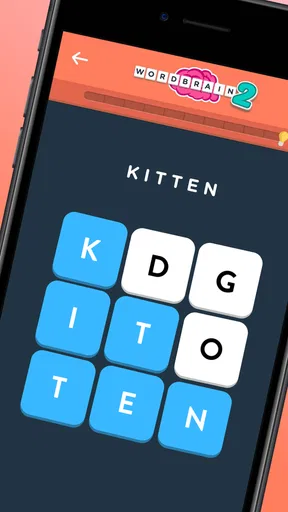
When I play a word puzzle on a small screen, I want the letters to be easy to scan and the next move to feel obvious, not buried in menus. WordBrain 2 gets much of that balance right: its grid-and-letter format puts the puzzle first, while themed challenges give each round a clear target. I find it best when I have a few quiet minutes and want a focused task rather than a game that demands constant attention.
Reading the board and finding your way
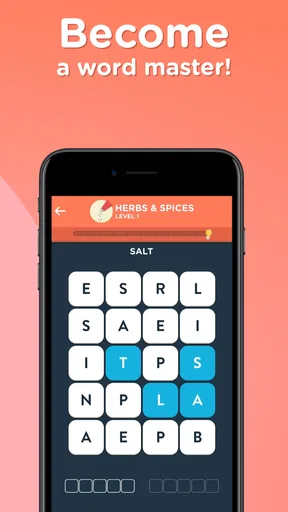
The uncluttered presentation helps me concentrate on the letter grid instead of learning a complicated interface. That matters in a word game, where a crowded screen can make it harder to notice useful letter patterns. The themed structure also gives a puzzle context: rather than searching for any possible word, I can think about which words fit the theme and the board’s constraints.
There is a trade-off, though. A clean screen does not necessarily make a difficult board easy to read. When several letter combinations seem plausible, I have to pause and inspect the grid carefully. I would approach a tricky puzzle by scanning for likely word beginnings, then considering how using those letters may affect what remains. That little planning step is part of the appeal, but it can feel demanding if I only want a quick, effortless distraction.
Touch, attention, and different ways to play
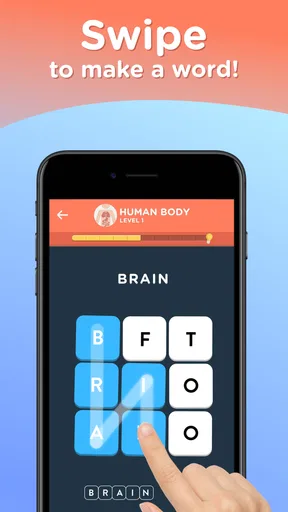
The central interaction relies on selecting letters by touch, so players who are comfortable with precise screen gestures are likely to feel at home. I would take extra care on a compact phone screen or when using the game one-handed: a rushed swipe can be less dependable than a deliberate move. Playing with the device steady and giving each selection a moment of attention makes the puzzle feel more controlled.
The quiet, board-focused style can suit someone who prefers limited visual activity, but it still asks for sustained visual attention and word recognition. That can be tiring for players who find small text, busy letter grids, or prolonged screen focus uncomfortable. I would try a short session first and see whether the board remains comfortable to read on the device being used. The game’s simple presentation is a helpful design choice, not a substitute for every player’s individual needs.
Where it fits into an ordinary day
A realistic use for me is opening a puzzle while waiting for a friend or during a short break, then stopping when I need to move on. Because the challenge is self-contained around a grid, it is easy to focus on one board rather than follow a long story. But it is not the best choice when I need to keep my eyes on my surroundings, listen closely to someone, or use my hands for another task. A word puzzle still needs attention, even when its rounds fit spare moments.
Gameplay That Keeps You Hooked
The first thing that struck me about WordBrain 2 was the sheer simplicity of the interface. You know how some games are so cluttered that you don’t even know where to start? Not here. It’s clean, intuitive, and basically invites you to start connecting those letters right away.
Worth Reading Before You Choose

EA SPORTS FC Mobile 26 Is a Bigger Football Game, but It Takes Time

Flipboard Shows What News Apps Must Do Beyond the Feed

Switching to Android Auto Means Rethinking Your Driving Routine

Google Calendar Makes a Crowded Week Easier to Manage

Ludo King Makes the Most of the Minutes Between Plans

Baby Panda World Brings Quick Play to Modern Phones, but Its Game Library Feels Busy
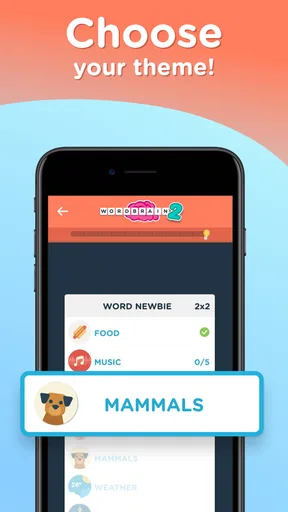
The game kicks off with easier puzzles to ease you in, but don’t let that fool you. As you progress, the puzzles ramp up in difficulty, and soon you’ll find yourself racking your brain trying to find the right word. What’s cool is the variety of themes you can play with. Whether it’s animals, food, or professions, each theme brings a fresh set of challenges that keep the gameplay far from monotonous.
A Brain Workout
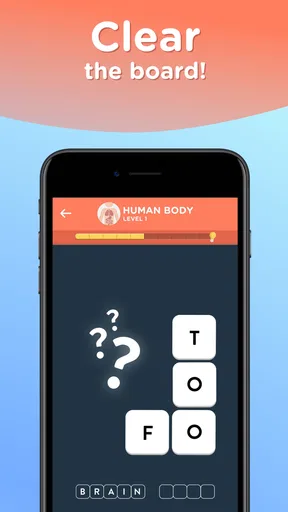
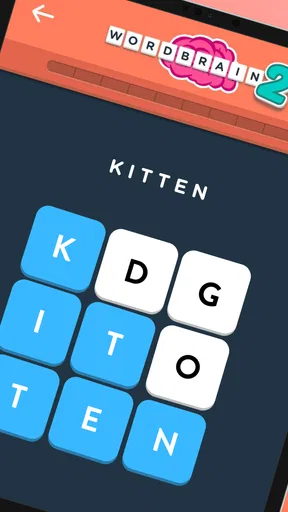
Playing WordBrain 2 is like giving your mind a workout without the need for gym gear. The way you have to connect letters in a grid to form words is engaging. It’s not just about finding any word; it’s about finding the right word that fits the puzzle. This game doesn’t just test your vocabulary but also your strategic thinking. Sometimes you have to think a few steps ahead to ensure the letters fall into place perfectly for the next word.
And let’s talk about the hints. They’re a lifesaver! If you ever get stuck, which trust me, you will, the hints are there to nudge you in the right direction. But use them wisely; they don’t come free!
Design and Usability
The visuals are simple yet effective. There are no flashy graphics, but that’s part of the charm. It’s all about focusing on the puzzle, and the straightforward design ensures that. The colors are easy on the eyes, and the animations when you complete a level are satisfying without being over the top.
As for usability, the app runs smoothly on both Android and iOS. I didn’t encounter any bugs or glitches during my playthroughs, which is always a big plus. The touch response is spot-on, making it easy to swipe through letters without any frustration.
Hints, pacing, and the kind of word game you want
Hints are most useful when I have narrowed a board down to a few possibilities but cannot see which word should come first. I try not to spend one just because a puzzle feels difficult at the first glance: a short pause and a fresh scan can reveal a route I missed. Since hints are not free, treating them as a way past a genuine block rather than a routine shortcut makes the choice feel more deliberate.
That approach also clarifies what this game offers compared with familiar word-game alternatives. A conventional word search rewards spotting words already laid out in a grid; a crossword asks you to solve clues and fill intersecting answers. Here, I enjoy the extra layer of deciding which word to trace and how that choice affects the letters left for later. If I want clue-solving or a rapid stream of unrelated rounds, another format may suit me better. If I like fitting a themed answer into a constrained letter puzzle, this is the more satisfying kind of challenge.
Who will enjoy it, and who may prefer something else
I would recommend it to people who enjoy vocabulary puzzles but also like a small planning problem. The theme can help focus guesses, while the changing arrangement of letters keeps the task from feeling like simply listing words on a topic. It can be a pleasant solo activity for a break, a commute when I am seated and able to concentrate, or a quiet moment at home. It is also approachable for someone who does not want to learn a complicated set of controls before starting.
It is less suited to anyone who wants a game that can be played entirely by sound, demands no visual scanning, or offers effortless progress at every turn. It may also frustrate players who dislike being stuck between plausible answers or who want every hint to be an unlimited, consequence-free nudge. For a very casual session, I would rather choose a simpler word search; for a deeper clue-driven challenge, I would reach for a crossword. The best fit depends on whether the letter ordering and planning are enjoyable to you or feel like unnecessary friction.
Practical details before you start
WordBrain 2 is a free word game from MAG Interactive, rated for Everyone, with in-app purchases listed from $0.99 to $14.99 per item. It has a 4.5 average from around 81,000 ratings, and has been installed over 5 million times. Those figures suggest a substantial audience, but I would still judge it by whether its particular puzzle style suits me. The current version is 1.9.58, and it requires Android 7.0 or later on Android devices.
If you are wondering whether you can make progress without paying, the most important practical point is that hints are a limited resource rather than something to use automatically. I would first try a different reading of the board, especially when a theme brings several related words to mind. Purchases are optional, but the possibility of buying items is worth bearing in mind if you are choosing a game for a child or prefer to avoid in-app spending. Its Everyone age rating makes it broadly suitable in content terms, while the puzzle’s visual and attention demands still vary from player to player.
A fair fit for focused puzzle breaks
The game’s strongest quality is the way a simple letter grid becomes a sequence of small decisions: identify a likely word, trace it, then reassess what remains. Its themed puzzles give that process direction, and its restrained presentation keeps the focus where I want it. The main limitation is equally clear: when the right answer is elusive, progress can depend on patience, careful visual scanning, or spending a hint.
Ever found yourself tangled in the web of words, feeling like a true wordsmith? Well, that's exactly what WordBrain 2 might make you feel like! From the creators of the original WordBrain, this game is here to challenge your vocabulary in the most entertaining way possible. Let me take you through my experience with this word puzzle wonder.
Why You Should Try It
If you’re someone who loves challenges and enjoys word games, WordBrain 2 should definitely be on your list. It’s perfect for those spare moments, whether you’re waiting for a friend or just looking to unwind after a long day. Plus, it’s a great way to keep your brain sharp!
Whether you’re a seasoned word game pro or a casual player looking for something fun and stimulating, this game has something for everyone. And with regular updates and new levels being added, it’s a game that keeps on giving.
In a world where apps come and go, WordBrain 2 stands out as a must-have for word enthusiasts. So go ahead, give it a try, and see if you can become the ultimate word brain!
Pros
- Challenging puzzles enhance vocabulary skills.
- Intuitive interface makes navigation easy.
- Regular updates with new levels and themes.
- Offline mode available for on-the-go play.
- Hints feature helps when you're stuck.
Cons
- Can become repetitive over time.
- Some puzzles require in-app purchases.
- Ads can be intrusive between levels.
- Difficulty spikes may frustrate beginners.
- Limited customization for game settings.
FAQs for WordBrain 2 - word puzzle game
What is WordBrain 2 and how does it work?
WordBrain 2 is a challenging word puzzle game that encourages players to solve puzzles by finding hidden words within a grid. The game progresses in difficulty, requiring players to think strategically and expand their vocabulary. It features multiple levels and themes, each with unique challenges, making it a stimulating experience for anyone who loves word games.
Is WordBrain 2 free to play?
WordBrain 2 is free to download and play, with optional in-app purchases available. These purchases can enhance the gaming experience by providing hints or additional levels. However, players can fully enjoy the game without spending any money, as it offers ample opportunities to earn hints through gameplay.
What platforms is WordBrain 2 available on?
WordBrain 2 is available on both Android and iOS platforms. It can be downloaded from the Google Play Store for Android devices and the Apple App Store for iOS devices. The game is designed to run smoothly on a wide range of smartphones and tablets, providing a seamless user experience.
Does WordBrain 2 require an internet connection?
WordBrain 2 can be played offline, making it perfect for on-the-go entertainment without needing an internet connection. However, certain features, such as in-app purchases or accessing leaderboards, do require an internet connection. This flexibility allows users to enjoy the game anytime and anywhere.
How does WordBrain 2 handle user data and privacy?
WordBrain 2 is committed to user privacy and adheres to standard data protection practices. The game may collect limited user data for improving gameplay experience and providing personalized content. Users can review the privacy policy within the app for detailed information on how their data is handled and ensure it aligns with their privacy preferences.


